At the start of 2026 I had around 500 followers on Threads. As I write this in October, I just crossed 15,000.
I didn’t buy followers, join engagement pods, or spend hours per day replying to big accounts. I have a full-time job and two small boys. Most of this was built in the time left after their bedtime.
What I did have was a system I created around my life, and a platform that happened to reward it. Threads crossed 500 million monthly active users this year, and its algorithm still gives a new account a real shot at reaching millions of people. That combo doesn’t last forever on any platform.
In the last 180 days alone, my posts pulled 14.2 million views and brought in close to 1,000 email subscribers.
This article is my full playbook: what I changed, in what order, and what I’d skip if I were starting again today.
Why Threads is great for small creators
Most social platforms reward accounts that are already big. Threads, at least right now, behaves differently.
I’ve seen accounts with ten followers get a huge response to a post, and accounts with 100,000 followers get only a few hundred views. The algorithm doesn’t seem to care much about how big you are, but it cares about how people react to your post.
My own numbers point the same way: around 90% of my views come from people who don’t follow me. That means your follower count isn’t what decides your reach.
Each post gets shown to a seed audience first, usually about 2% to 5% of your active followers, mixed with a handful of highly relevant non-followers. If they stop and engage, your post goes further. If they scroll past, momentum slows down and its reach shrinks.
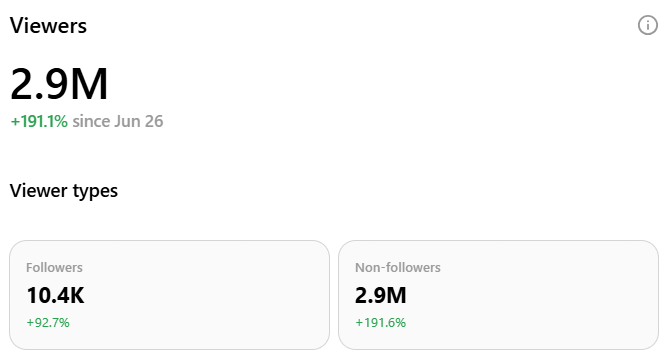
For someone starting from zero, this is the most important thing to understand about the platform: each new post is another opportunity to reach someone new. So write with that person in mind.
My growth timeline
Before the steps, here’s how the growth actually happened, using the numbers I shared with my newsletter subscribers at the time.
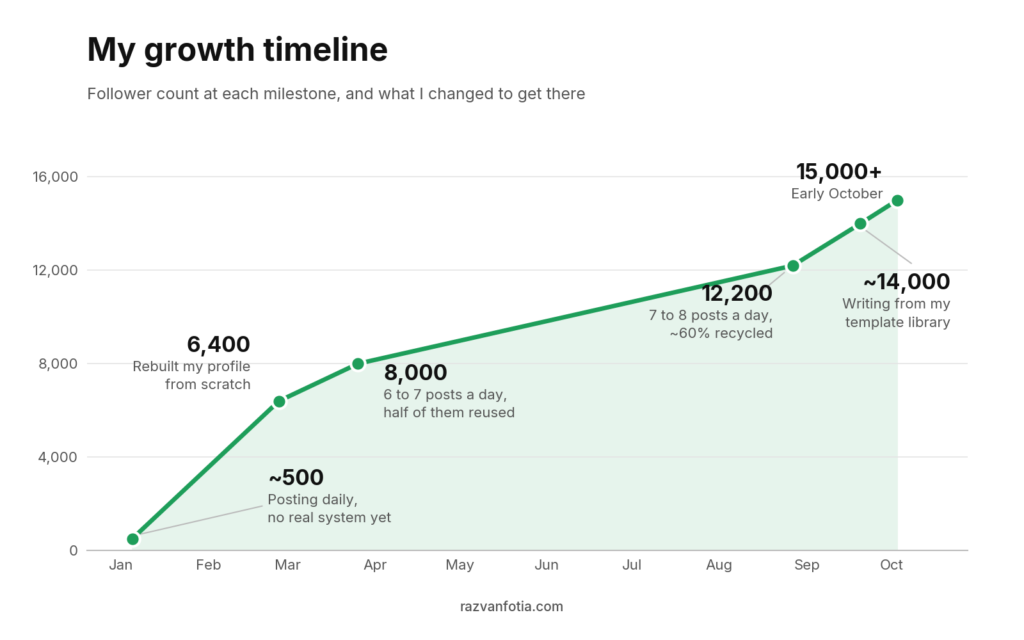
Two things stand out when I look at this.
The profile overhaul was one of the first changes I made. It gave visitors a clearer picture of what I write about and why they might want more.
After that, the work became more repeatable: write, publish, review, reuse. Templates helped me write new posts. Recycling meant I didn’t have to come up with seven or eight new ideas every day.
Build a profile that converts
A post gives someone a reason to look at your profile, and your profile should give them a reason to stay.
Here’s the path most followers will take:
- reads your post
- tap your name
- looks at your photo
- reads your bio
- reads your pinned post and recent content
- then decide to follow or not.
When I rebuilt mine in early 2026, I went through four pieces in this order.
Your name and handle
This appears next to every post you write, so it needs to be simple and recognizable. Use your real name, and optionally add one or two keywords if it helps explain your work.
For example: Julia Lee | Copywriter.
Keep your handle as close to your name or brand as you can. Someone who remembers you shouldn’t have to remember a string of numbers to find you again.
Your headshot
People decide about you based on your photo before they read a single word. A clear headshot makes you more recognizable in the feed, and more trustworthy.
As a tip here, you don’t need a photographer. Face a window for natural light, use your phone camera, remove the background with a tool like Canva, and crop to your head and shoulders. Your photo shows up tiny on most screens, so your face needs to fill it.

Your bio
Your bio is probably the most important part of your profile.
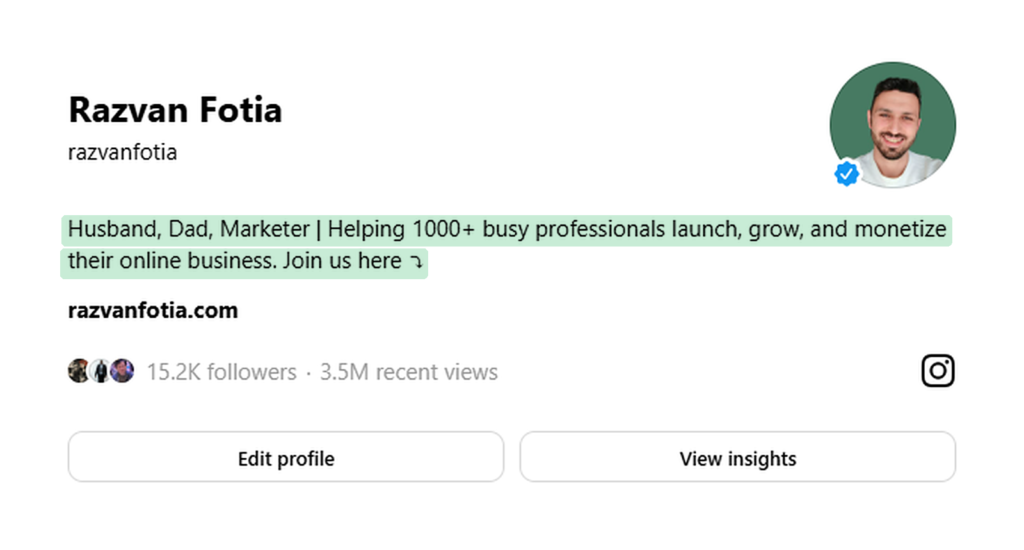
In just a few seconds, it should clearly communicate: who are you, who you help, and how you help them. Think of it as your positioning statement. When someone lands on your profile, they should clearly understand the value you bring to them.
To make it even stronger, you can also add something that builds credibility (results, years of experience, or a project you’re working on). And somewhere to go next, like your newsletter link, a free resource or your paid offer.
Here’s mine for example:
Your pinned post
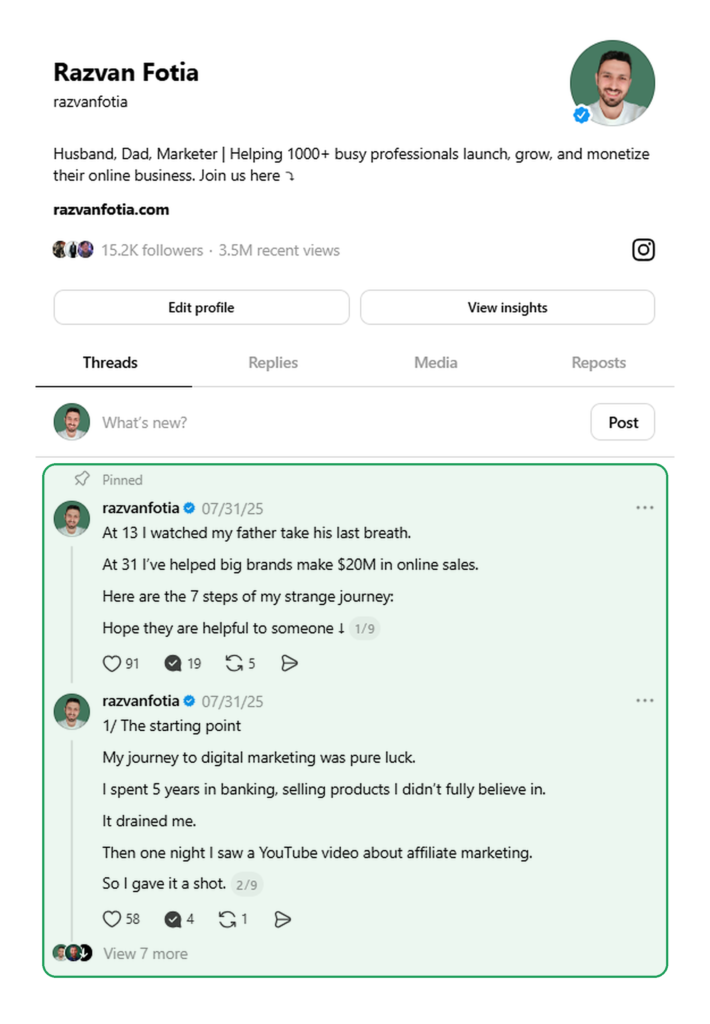
Your pinned post is the first thing people see when they land on your profile, and most people either don’t use the feature or pin something random.
If you’re new, a short story about where you started, what changed, and what you’re learning can work well. People connect with people before they connect with expertise. Over time swap it for your best value post, a breakdown or guide with real results and a soft call to action. If you have a product, this is also where people who are ready can find it.
Once the profile is ready to catch attention, you need a reliable way to create posts that get it.
Build a template library
Starting from a blank page means solving two problems at once: what to say and how to say it.
I keep a template library in Notion so I don’t have to invent the structure every time I write. I haven’t needed to create a new post structure from scratch in months.
The library comes from studying posts that work. I look at how they open, develop an idea, and end, then try the structure with something I want to say.
Collect posts worth learning from
Every week I spend time on Threads, X, Substack, Instagram and LinkedIn looking for posts that performed well. When I find one, the question I’m trying to answer is: why did this land so hard when the point itself is obvious?
Before saving one, I finish this sentence: “This held my attention because…”
Maybe the opening challenged something I assumed. Maybe a concrete example made an abstract point easy to understand. Maybe the ending changed how I read the first line.
That note is what makes it useful later.
Look underneath the words
Here’s one of my posts:
The topic is familiar. Enjoy the simple things. But the post doesn’t start there. It opens by asking you to embrace something you’ve probably spent years avoiding, which creates a small question: why would I want that? The second line gives “boring” a concrete meaning. The third questions the pressure to make life more impressive. The last line returns to the opening word with a different meaning.
That’s four jobs in four lines: challenge an assumption, make the alternative concrete, explain the tension, resolve the opening.
Turn it into a template
Once you understand how a post works, save a version you can reuse:
Be [undervalued quality].
[List of simple actions].
We [verb] [desired outcome].
The [undervalued quality] [noun] is the [positive quality] [noun].
Then plug in your own topic. If you write about learning, the post might look something like this:
Be a beginner.
Ask, try, fail, listen, repeat.
You don’t need to look good to learn.
Being a beginner is where getting good starts.
For each template I store the source link, the type (hook, ending or full post), the structure, and the version I wrote with it. That last field matters most over time, because it shows which structures help me explain things better and in which format.
A small templates library in place makes writing a post take minutes instead of hours, and that makes the next step possible.
Give your best posts another run
This is the part most people resist, and it’s the one that made the biggest difference for me.
About 60% of what I post is recycled. I go back 30, 60 or 90 days, pull a post that performed well, update it or leave it as is, and publish it again.
Here’s why that works.
Only a small share of your followers see any given post. The ones who did probably won’t remember it. And everyone who followed you since then never saw it. You’re the only person who has read everything you’ve written.
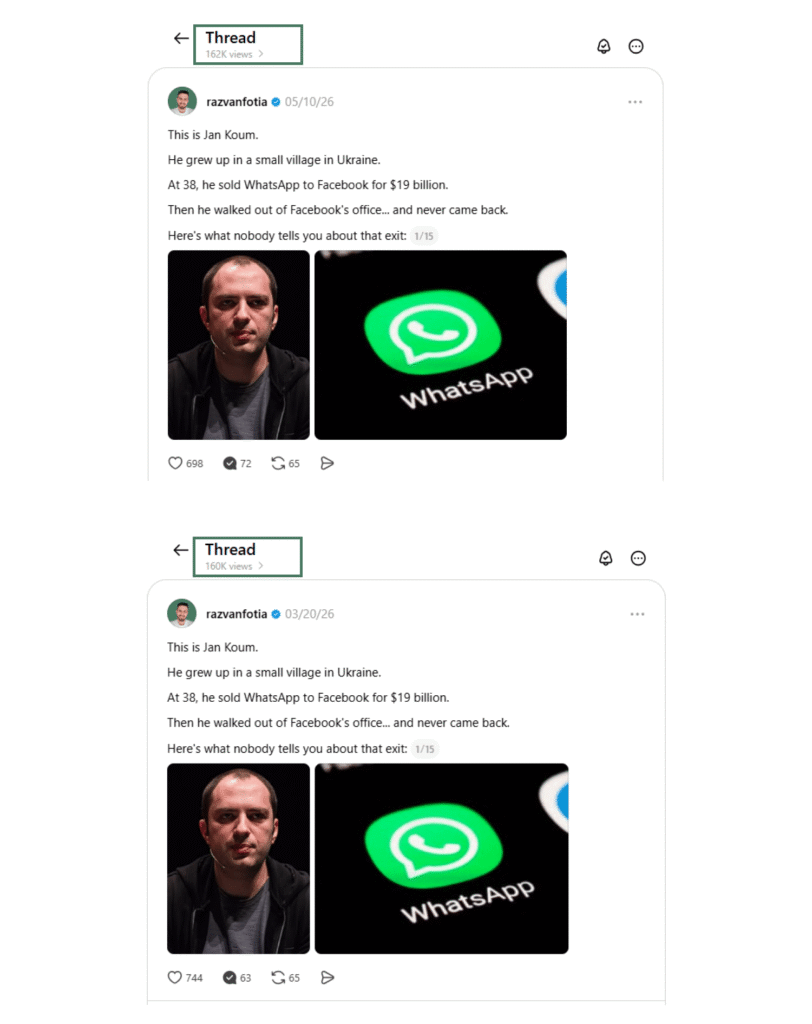
My rules are simple:
– Post performed well? Run it again in 30 to 90 days.
– Post performed badly? Keep the topic, change the hook, and try again.
I track this in the same Notion database as my templates, with repurpose dates set at 3, 6, 9 and 12 months, so I never have to remember what’s due.
Spend your reply time on relationships
The most common Threads advice is to become a “reply guy”: comment on big accounts, add value in the replies, and get noticed.
I did it, and I still do it sometimes. It helps when you’re starting out because it’s how you introduce yourself to the people in your space and some of my best connections started this way.
But as a growth strategy, the math doesn’t work for most people. Unless you can spend four or five hours a day on the platform, it won’t move the needle much. With a full-time job and a family, that time is far better spent writing better posts.
So reply for relationships. Post for growth.
Bonus: Give your new followers a next step
Once your account starts growing, decide what you want that audience to lead to. For me, it’s my email list.
I want people who find my posts useful to have a way to hear from me again. My newsletter gives them that option without relying entirely on whether another post appears in their feed. Your email list is the only audience nobody can take away from you, so every part of my Threads setup points there.
The problem is that links in the main post seem to hurt reach.
The approach that worked for me is this:
– Write the post and publish it without a link.
– If the post took off, put the link in the first reply, usually after 60 min.
The main post keeps its reach, and anyone who wants to know more has an easy way to find it.
I automate this with autoplugs. An autoplug is a reply that gets added automatically once a post crosses an engagement threshold you set. When a post starts taking off and reaching new people, my newsletter invite shows up underneath it while it’s still being pushed. BlackTwist and Hypefury are great tools that can help you set one up.
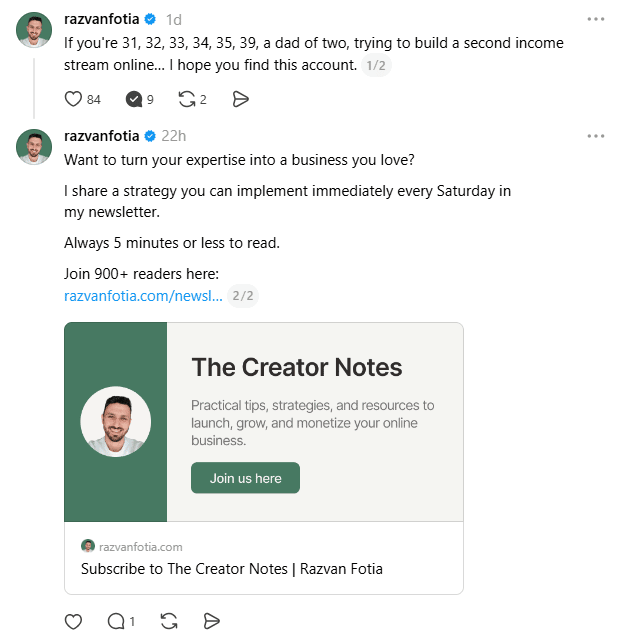
My bio also points straight to my newsletter landing page, so readers don’t have to choose between ten different destinations before finding it.
To conclude
Growing on Threads comes down to a handful of things done consistently.
Fix your profile first. Make it clear who your posts are for and why someone should follow you. Then collect a few posts worth studying, turn them into templates, and use those structures to write your first batch. Choose a publishing pace you can sustain, and as results come in, save the data.
That’s how I made the work manageable. I still have to write, experiment, and pay attention to what readers respond to. But when I sit down and write, I have somewhere to start.
FAQs
How long does it take to grow on Threads?
It depends on your volume, content type, niche, and your profile more than on time. I went from roughly 500 followers at the start of 2026 to 15,000 by September.
How many times a day should you post on Threads?
I publish seven or eight times a day, with about 60% recycled content. Start with a pace you can maintain, even if that’s one post a day, and build from there.
Do replies help you grow on Threads?
They can help people discover you and lead to useful relationships. For me, writing my own posts has been a better use of the time I have available for audience growth.
Should you put links in Threads posts?
Keep links out of the main post, since they seem to reduce reach. Put the link in the first reply, or use a tool like BlackTwist or Hypefury to add it automatically once a post performs.
Does follower count matter on Threads?
Much less than on other platforms. Around 90% of my views come from people who don’t follow me, because Threads judges each post on its own.
Can you grow on Threads with a full-time job?
Yes. I built my account around a full-time job and being a dad of two small boys, mostly in the evenings. The template library, batching and recycling are what make the volume possible without it taking over your life.